

Color grade in 3 easy steps.
Convert your log, pick a look, add the finish. That's the whole grade - one clip, about a minute. And the finish is the real thing: film grain, halation and glow built in - the texture a LUT can't add. No nodes, no scopes, no LUT hunting.
Works in DaVinci Resolve Studio, Premiere Pro and After Effects on Mac.

 LOG · FLAT
COLORFLOW™
LOG · FLAT
COLORFLOW™
Drag to compare - camera log vs. one ColorFlow™ look.
See it in action
You can light it and frame it. Color is where you get stuck.
You shoot log, but it still looks flat - not cinematic.
Grading eats your whole evening fighting nodes and scopes.
Your LUT pack never quite fits your camera or your shot.
ColorFlow™ turns flat log into finished film in 3 steps - so you stop dreading color and get back to creating.
Convert. Look. Finish.
One effect, one clip, about a minute. Step 1: convert from log - pick your camera. Step 2: choose a look - browse live and dial the strength. Step 3: add the finish - grain, halation, glow. No node trees, no scopes, no hunting for LUTs.

Load the file
Find ColorFlow in the effects library and drop it on your clip - one effect, one node, nothing to wire up. This flat log frame is where every grade starts.
The whole grade lives on a single node or layer
No node trees. No scopes. No stacking conversion clips, LUTs and grain plugins. Convert, look and finish all sit in one effect you learn in five minutes and reuse on every project - so you grade the shot, not the software.

 LOG · FLAT
COLORFLOW™
LOG · FLAT
COLORFLOW™
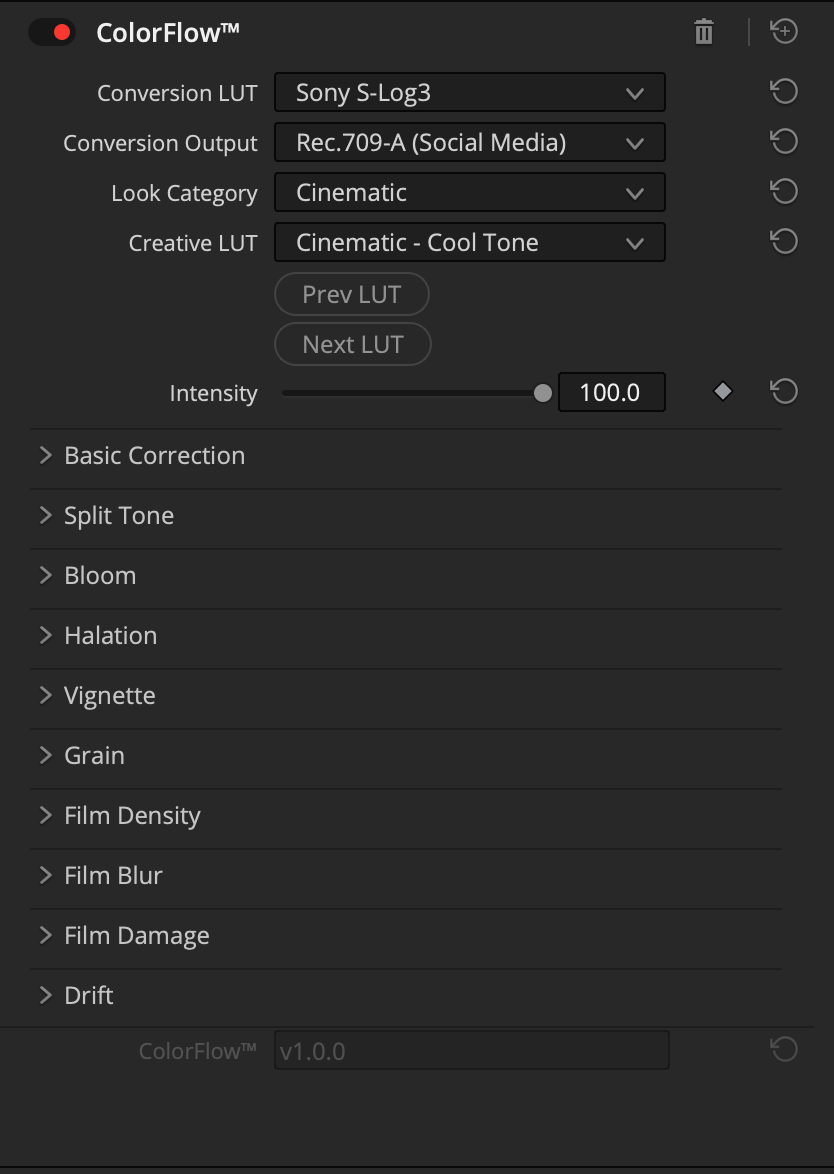
Drag the viewer - and that is the real ColorFlow™ panel on the right, doing the whole grade on a single node.
All My LUTs are inside.
Cinematic, Film, Mobile, Lifestyle, Underwater and B&W - real looks, hand-built, not recycled 3D LUTs. Browse them live with Prev/Next and dial Intensity 0–100, so every look fits the shot instead of fighting it.

 LOGCOLORFLOW

 LOGCOLORFLOW

 LOGCOLORFLOW

 LOGCOLORFLOW
Drag any clip — your log on the left, the ColorFlow grade on the right.
The part a LUT can’t do: real film texture
Grain, halation and glow are what separate graded video from footage that reads as film - and a flat LUT can’t add any of them. ColorFlow™ builds them in, right in the same panel. Dial each one until the shot looks expensive.
Bloom
Soft, filmic glow that blooms out of your highlights.
Halation
Warm red halo around bright edges - the classic film bleed.
Grain
Organic film grain with adjustable size and strength.
Vignette
Draw the eye in with a shapeable, natural falloff.
Film Density
Push contrast and richness like a denser film stock.
Film Blur
Gentle softening for that dreamy, vintage-glass feel.
Film Damage
Dust, scratches and age for a true archival vibe.
Split Tone
Color your shadows and highlights independently.
Drift
Subtle hue drift for organic, alive-looking color.
Built for YOUR camera and YOUR app
26 log profiles across 10 brands - built from the manufacturers’ published curves, so your S-Log3, V-Log or C-Log converts accurately, not by guess. One plugin runs in DaVinci Resolve Studio, Premiere Pro and After Effects on Mac. Pick your camera, pick your app - you’re covered.
Includes DJI body - Mavic 3 & 4 Pro, Air 3 / 3S, Mini, Osmo Pocket, Action & Nano - plus HLG. 26 profiles in all.
Why ColorFlow™ beats a LUT pack
✕ A LUT pack
- – Only changes color - no grain, halation or glow
- – Generic curves that rarely match your exact log
- – You stack conversion clips, LUTs and grain plugins yourself
- – You fake the film character by hand, every time
✦ ColorFlow™
- ✓ Convert, look AND real film finish in one effect
- ✓ Converts your exact log first, from real published curves
- ✓ Real grain, halation, glow & film damage built in and dialable
- ✓ One clip, one panel - Resolve Studio, Premiere & After Effects
Creators are switching to ColorFlow™
“ColorFlow just gives me the look I want way faster.”
“Finally, a plugin that doesn’t make color grading feel like homework.”
“built-in looks are already strong, but the grain, halation and glow are what made my footage actually feel finished”
Pay once. Yours for life.
No subscription. Pay once, and keep every future update free.
- ✓ 26 log profiles across 10 camera brands, from published curves
- ✓ All My LUTs packs (Cinematic, Lifestyle, Film, Underwater, Mobile, B&W)
- ✓ Built-in film finishing: grain, halation, glow, vignette & more
- ✓ Works in DaVinci Resolve Studio, Premiere Pro & After Effects on Mac
- ✓ GPU/Metal accelerated for Apple Silicon - fast in your edit
- ✓ Lifetime access, free updates.
Good to know
Will it work with my camera and my app? +
Almost certainly. 26 log profiles across 10 brands - ARRI, Sony, RED, Canon, Panasonic, Blackmagic, Fujifilm, Nikon, GoPro, and every DJI body - all built from manufacturers’ published curves. And it’s one plugin that runs in DaVinci Resolve Studio, Premiere Pro, and After Effects on Mac. Pick your camera, pick your app - you’re covered.
Do I need color-grading skills to make it look good? +
No. The whole grade is 3 steps in about a minute: convert from log, choose a look, add the finish. No node trees, no scopes, no LUT hunting. Browse looks live and dial the intensity until it feels right.
Is it worth $49.99, or is it just another LUT pack? +
A LUT pack is only color. ColorFlow™ does accurate per-camera conversion, 97 hand-built looks, AND real film finishing - grain, halation, glow, film damage - that no LUT can add. It’s $49.99 once: lifetime access, free updates.
Will it slow down my edit or hammer my Mac? +
No. ColorFlow™ is built for Mac and Apple Silicon with GPU/Metal acceleration, and the whole grade is one effect on one clip. One panel, fast playback, no plugin stack to manage.
Can I control how strong the look is? +
Yes. Every look has an Intensity slider from 0 to 100, and the finishing effects - grain, halation, glow, vignette and more - each have their own controls. You tune the shot instead of fighting the file.